
Editor setup: VS Code
Set up VS Code for Sneferu themes: install the Sneferu extension for completion, hover docs, live diagnostics, theme checks, formatting and a live preview.
On this page
The Sneferu extension for Visual Studio Code knows the language: it completes
hk-* tags, props, filters, settings and translation keys, shows the tag
reference on hover, runs the Sneferu compiler as you type, flags problems a
reviewer would catch, formats with the Sneferu Prettier plugin and shows a live
preview of the theme beside the editor. It includes the CLI, so you do not need
Node.js or npm install to use it.
code --install-extension sneferu-0.1.0.vsix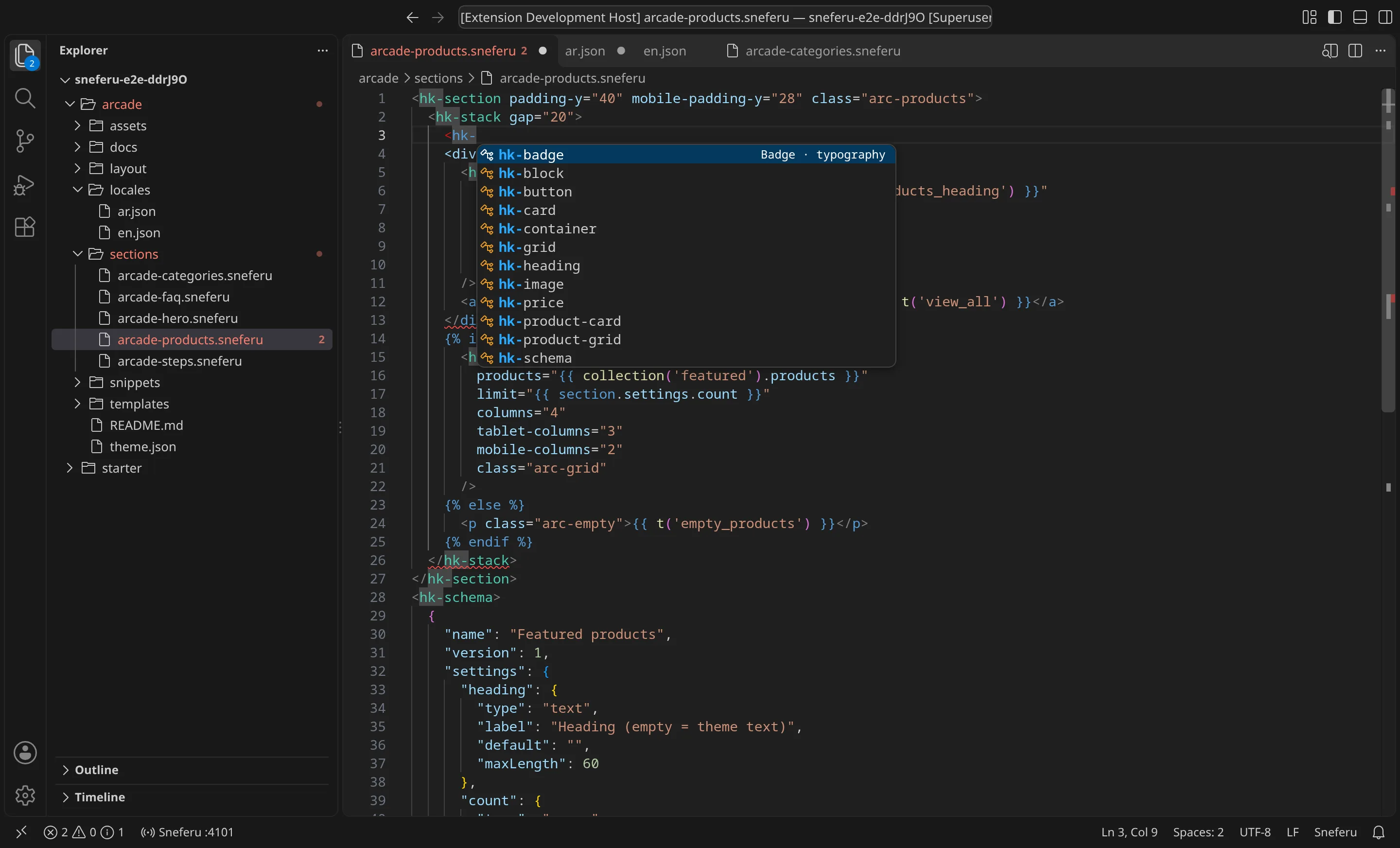
Install
The extension is published by Hekana as hekana.sneferu.
From the .vsix file (now)
- Download sneferu-0.1.0.vsix.
- In VS Code open the Extensions view, click the
…menu at its top and choose Install from VSIX…, then pick the file. Or runcode --install-extension sneferu-0.1.0.vsixin a terminal. - Open a theme folder (the folder with
theme.json). The extension starts when the folder has atheme.jsonor when you open a.sneferufile.
From the Marketplace (soon)
Once the extension is listed, search for Sneferu in the Extensions view, or
run code --install-extension hekana.sneferu. Editors that use Open VSX
(VSCodium, Cursor, Windsurf, Gitpod) will find it there under the same name.
An installed .vsix updates from the Marketplace like any other extension.
If you followed Format your theme and mapped
*.sneferu to html in .vscode/settings.json, remove that mapping: the
extension registers the sneferu language and formats it itself. Prettier and
.prettierrc keep working for the CLI and for CI.
Language support
- Highlighting for HTML,
hk-*tags,{{ }},{% %}and the JSON inside<hk-schema>. - Ctrl+/ (Cmd+/ on macOS) toggles
<!-- -->comments.{{,{%, quotes and brackets close themselves, and typing>after<hk-stack …adds</hk-stack>. - Renaming an opening tag renames its closing tag.
- Snippets: type
section,section-blocks,schema,setting,template-schema,if,ifelse,for,blocks,render,t,product-grid,imageorlayoutand press Tab.
Completion and hover
| Where you type | What it offers |
|---|---|
< | hk-* tags (required props filled in), allowed HTML elements |
| inside a tag | the tag's props, their tablet- and mobile- variants, class, id, role, title |
| inside a prop value | the prop's values: align="start", theme:accent for colours, true/false |
{{ or {% if | store, settings, section, block, forloop, loop variables, lookups |
after . | properties: section.settings.* from the file's own <hk-schema>, settings.* from theme.json, product fields in {% for p in collection('…').products %} |
after | | filters |
t(' or '…' | t | translation keys from locales/ |
{% render ' | snippet names |
asset_url(' | files in assets/ |
"type": " in <hk-schema> | field types |
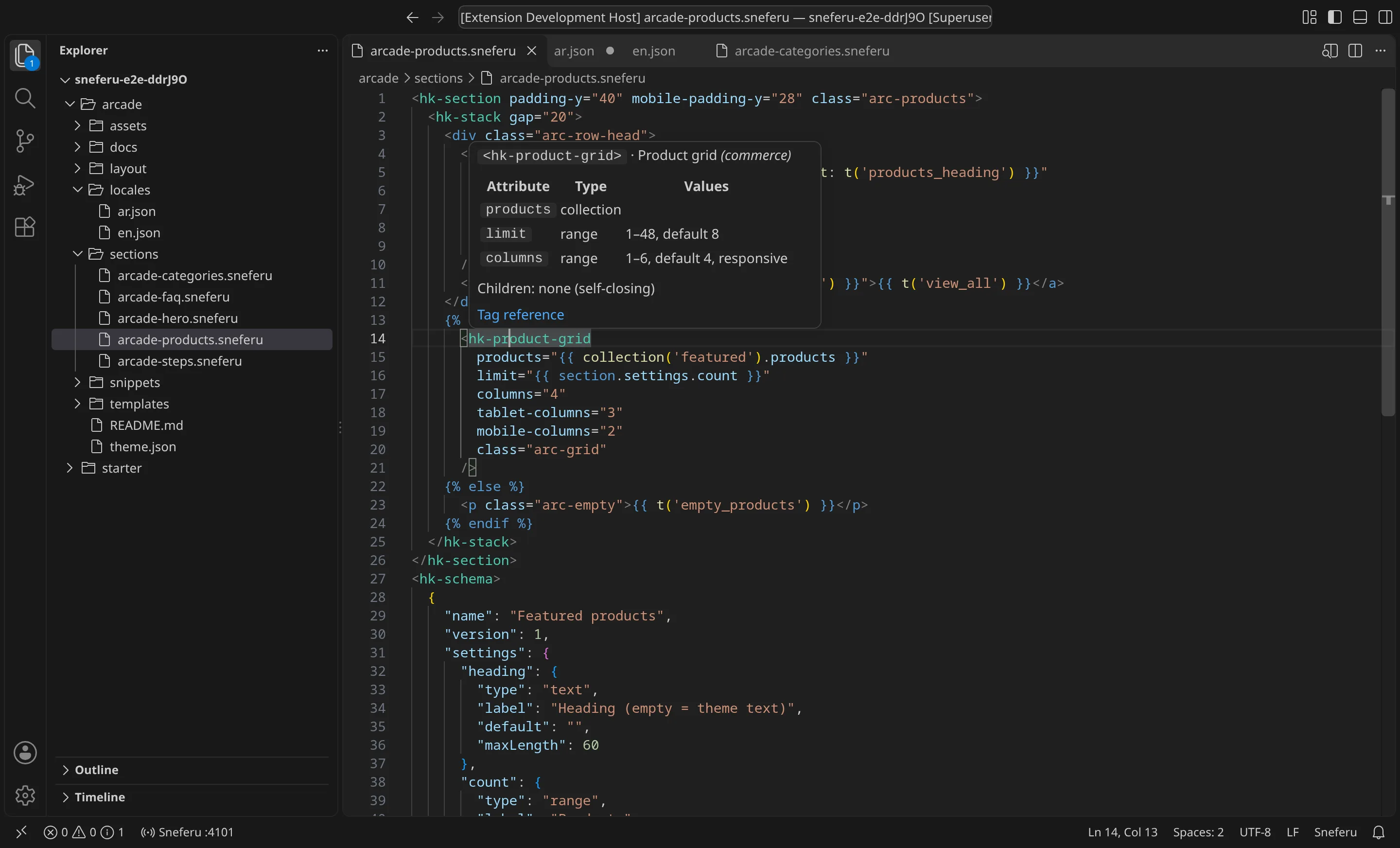
Hover shows the same reference: a tag's props with types, ranges and defaults; a filter or lookup; a setting's type, label and default; a translation key's text in every locale.
The tags, filters and lookups come from the SDK when the extension is built
(docs/reference/tags.json and the language reference), so each release of the
extension matches an SDK release.
Diagnostics
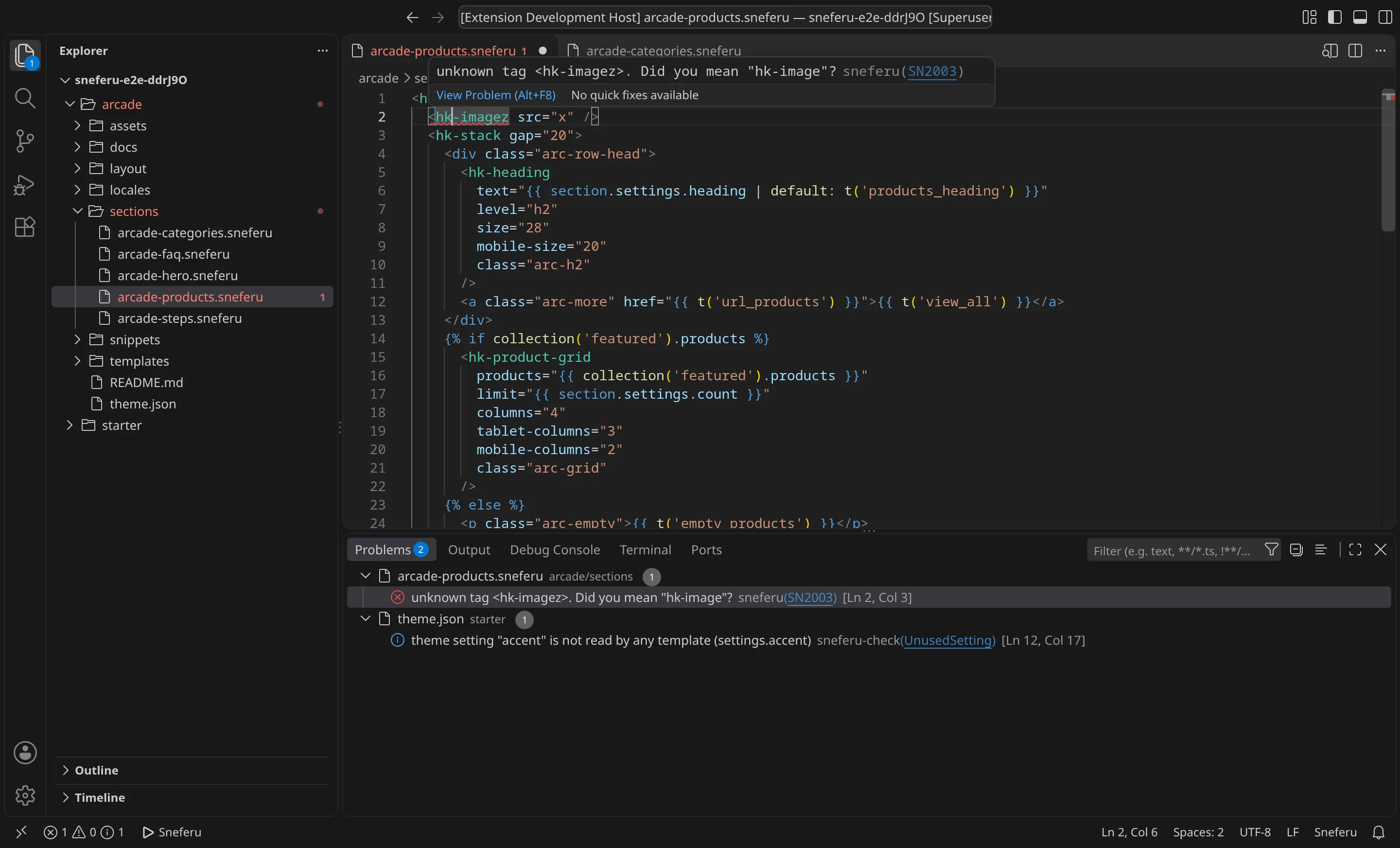
The extension runs the same compiler as sneferu validate on the whole theme,
including files you have not saved, about a quarter of a second after you stop
typing. Problems appear in the editor and in the Problems panel with their SN
code; click the code to open its entry in Diagnostics.
theme.json also gets completion and checks from a JSON schema.
Theme checks
Next to the compiler, the extension flags problems that compile but would be
caught in review. Each has a name, shown as its code. Turn one off with
"sneferu.checks.disabled": ["OrphanedSnippet"], or all of them with
"sneferu.checks.enable": false.
UnusedSetting
A setting in a section or block <hk-schema> that the file never reads as
section.settings.<key> (or block.settings.<key>), or a theme.json setting
no template reads as settings.<key>. The merchant would edit a field that
changes nothing. Remove it or use it.
UndefinedSetting
section.settings.<key> in a section whose schema does not declare <key>. It is
always empty. Usually a typo.
TranslationKeyExists
t('key') or 'key' | t where the default locale file has no key. The page
shows the key itself. The quick fix adds the key to every locale file, with the
key as its text, for you to translate.
MatchingTranslations
A key in locales/en.json that locales/ar.json does not have, or the other
way round. The quick fix copies the key and its text into the other file, for
you to translate.
MissingLocaleFile
theme.json lists a locale in locales that has no locales/<code>.json.
ImgAltText
<hk-image> or <img> without an alt attribute. Describe the picture, or
write alt="" for a decorative one. The quick fix adds alt="".
SchemaLabelEnglish
A schema name or setting label with no English text: a string in Arabic only,
or { "ar": "…" } without en. The theme editor shows en to English-speaking
merchants. Write { "en": "…", "ar": "…" }.
AssetSize
An asset over 500 KB (sneferu.checks.assetSizeWarnKb). The compiler rejects
assets over 2 MB (SN3007); this warns well before that.
MissingAsset
asset_url('file') where assets/file does not exist.
OrphanedSnippet
A snippet that no file renders with {% render %}. Shown as a hint.
Navigation
Ctrl+click (Cmd+click on macOS), or F12, on:
{% render 'name' %}: openssnippets/name.sneferu- a translation key: its line in each locale file
section.settings.<key>orsettings.<key>: the setting in the schema ortheme.json- a section
"type"in a template's<hk-schema>: the section file asset_url('file'): the asset
Formatting
Format Document (Shift+Alt+F, Shift+Option+F on macOS) uses Prettier and
@hekana/prettier-plugin-sneferu, with the theme's .prettierrc or
.prettierrc.json if it has one, so the result is the same as
sneferu format. As with the CLI, a change that would alter what the compiler
makes of the file is refused. To format on save, add to .vscode/settings.json:
{
  "[sneferu]": {
    "editor.formatOnSave": true
  }
}
Sneferu: Format Theme formats every file of the theme at once.
Live preview
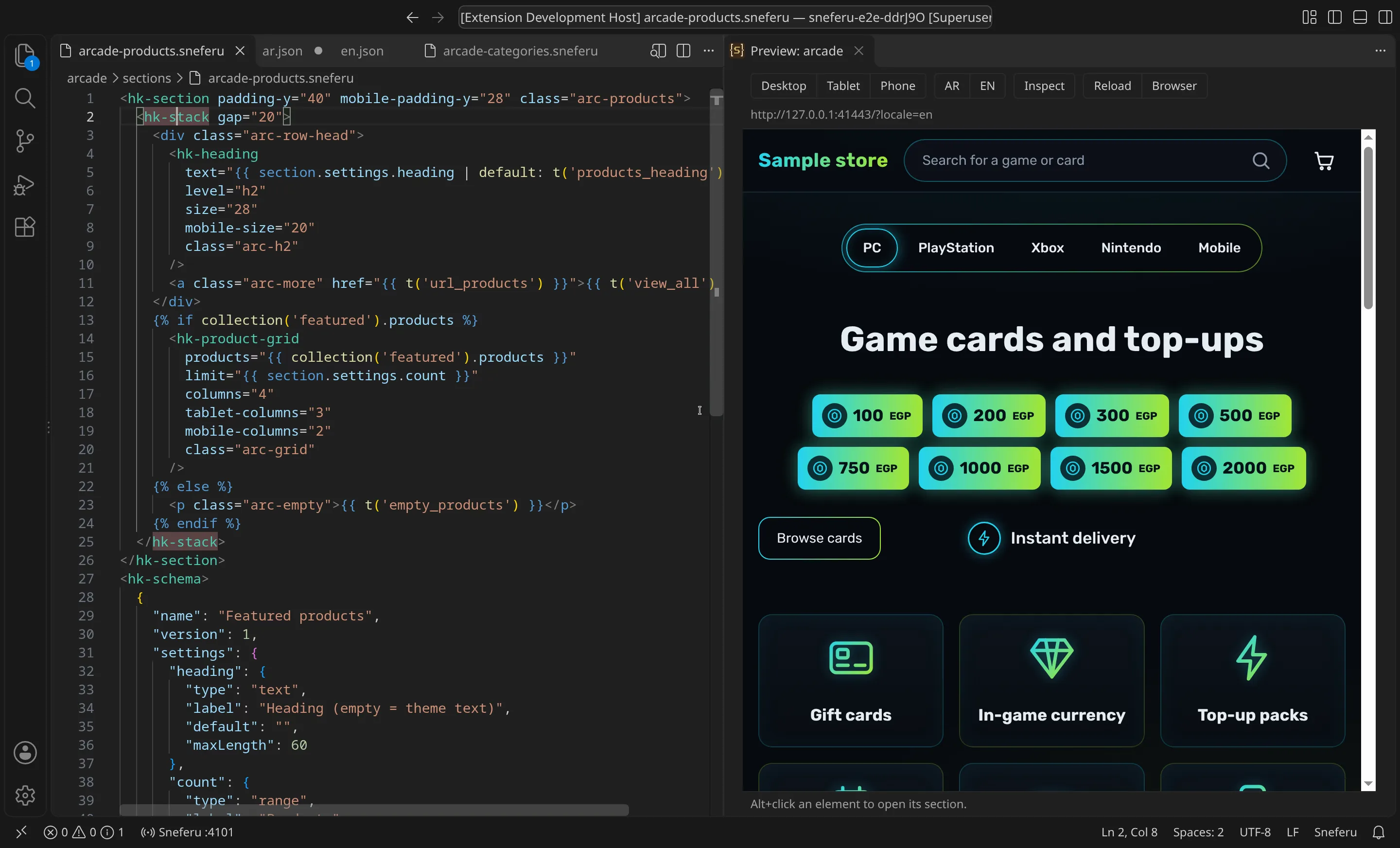
Sneferu: Open Preview (Ctrl+Shift+P, then type it), or the preview button at the
top right of a .sneferu editor, starts sneferu dev for the theme and opens
the preview beside the editor.
- Desktop, Tablet (820 px) and Phone (390 px) set the width.
- AR and EN switch the language, for themes that ship both.
- A drop-down picks the template when the theme has more than
index. - The preview reloads when you save a theme file.
- Inspect, then click a section in the preview, opens that section's file. Alt+click does the same without turning Inspect on.
- Browser opens the same page in your browser.
The status bar shows the dev server and its port; click it, or run
Sneferu: Stop Dev Server, to stop it. The preview uses the theme's sample
data, .sneferu-dev/data.json, or the file set in sneferu.preview.dataFile
(see Getting started).
Commands
| Command | Does |
|---|---|
| Sneferu: Open Preview | starts sneferu dev and opens the preview |
| Sneferu: Stop Dev Server | stops it |
| Sneferu: Validate Theme | checks the whole theme and lists the problems |
| Sneferu: Format Theme | sneferu format |
| Sneferu: Build Theme | sneferu build, to the theme's dist/ |
| Sneferu: Push to Dev Store | sneferu push --package <id> --dev-store, after you confirm |
| Sneferu: Log In | sneferu login in a terminal (see Get an API key) |
| Sneferu: Who Am I | sneferu whoami |
| Sneferu: Restart Language Server | restarts completion and diagnostics |
Push uses the theme's id from theme.json as the package and the key saved by
Log In, or HEKANA_TOKEN. See Push and publish.
Settings
| Setting | Default | Does |
|---|---|---|
sneferu.cliPath | empty | the CLI to run; empty uses the theme's own @hekana/sneferu from node_modules, else the one in the extension |
sneferu.preview.port | 4100 | the first port tried; the next free one is used when it is taken |
sneferu.preview.dataFile | empty | sample data for the preview, relative to the theme |
sneferu.preview.reloadOnSave | true | reload the preview on save |
sneferu.diagnostics.delay | 250 | milliseconds after typing before the theme is checked |
sneferu.checks.enable | true | run the theme checks |
sneferu.checks.disabled | [] | checks to turn off, by name |
sneferu.checks.assetSizeWarnKb | 500 | the AssetSize budget |
The extension runs the CLI with VS Code's own Node.js and no shell, so it needs nothing else installed on Windows, macOS or Linux. Over Remote SSH, WSL or Dev Containers it runs on the remote side and VS Code forwards the preview's port.